


Vyke: Second Phone/2nd Line
4.0484.00 Reviews
App Specs
- Version
- 1.22.5
- Updated On
- License
- Free
- Downloads
- 1,000,000+
- Developer
- Vyke Holding Limited
- Categories
- Communication
- Platform
- Android
Screenshots
 Analysis by AppCompare
I understand the appeal of a second number most clearly when it solves a small, recurring problem: sharing a contact number for a sale, a project, or a temporary commitment without giving out my everyday one. A separate handset feels like too much to manage for that. Vyke puts another line on the phone I already carry, which makes the idea easy to try. The real question, though, is whether it remains useful after the novelty of having a spare number wears off.
When a second line earns its place
Vyke: Second Phone/2nd Line is a communication app from Vyke Holding Limited, built around using virtual phone numbers for calls and texts. It is free to install, with in-app purchases ranging from $1.49 to $49.99 per item. The app is rated for Everyone, and its 4.1 average from around 15,000 ratings, alongside more than a million installs, suggests that the second-line idea has broad appeal without making it the right fit for every caller.
I can see the first-week appeal for someone who wants to separate work inquiries from personal conversations or needs a number to share while arranging a short-term commitment. The practical benefit is not just having another number; it is being able to decide which number to hand out in the first place. That boundary is most useful when I stick to it consistently, rather than sharing both numbers indiscriminately and creating the same clutter twice.
A realistic routine, not just a spare number
Imagine arranging a furniture pickup with someone you do not know well. I could share the Vyke number for calls and messages about the handover, then keep my regular number for family and close contacts. Once the pickup is done, I can stop using that line for new arrangements. This is a modest privacy habit, not a guarantee of anonymity: a second number helps separate contact routes, but I would still avoid sending sensitive details to a stranger.
That distinction matters because a virtual line is not the same as carrying a second SIM with its own mobile service. Vyke is useful when the goal is an additional way to communicate through an app; it is less suitable if I need a separate physical phone, want every call handled by my usual carrier, or depend on a number being accepted by a particular service. I would check that a number works for the specific purpose before making it the only contact route for something important.
A Handy Tool for Modern Communication
In today’s connected world, keeping your personal and professional lives separate is more important than ever. That’s where Vyke steps in. Setting up was a breeze. I downloaded the app, and within minutes, I had a second number ready to go. No complicated procedures, just straightforward functionality.
Getting Started with Vyke
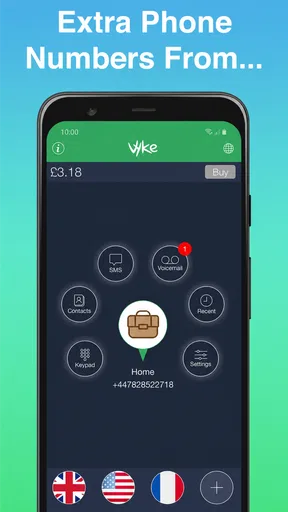
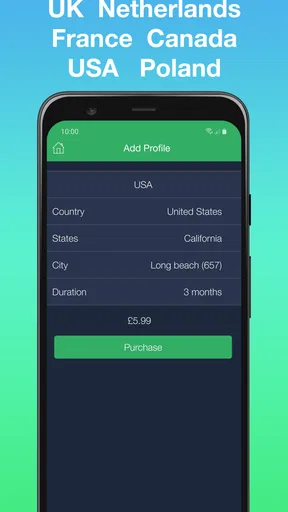
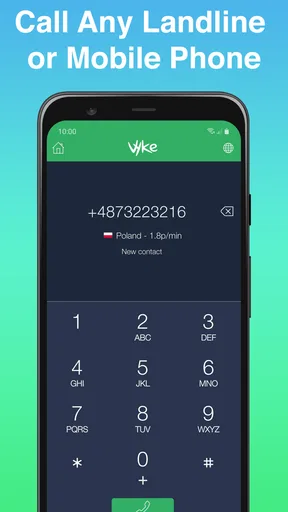
Once you download Vyke, you’re greeted with a simple and intuitive interface. The app guides you through the process of selecting a new number, and you can choose from various countries. I went with a UK number, but the options are plentiful, catering to a global audience.
Worth Reading Before You Choose

EA SPORTS FC Mobile 26 Is a Bigger Football Game, but It Takes Time

Flipboard Shows What News Apps Must Do Beyond the Feed

Switching to Android Auto Means Rethinking Your Driving Routine

Google Calendar Makes a Crowded Week Easier to Manage

Ludo King Makes the Most of the Minutes Between Plans

Baby Panda World Brings Quick Play to Modern Phones, but Its Game Library Feels Busy
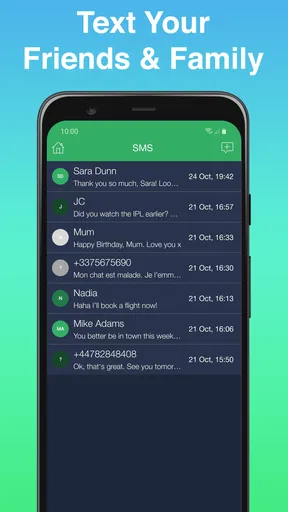
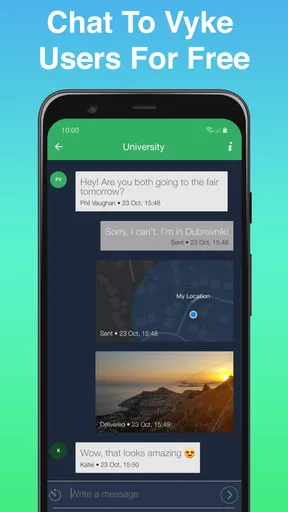
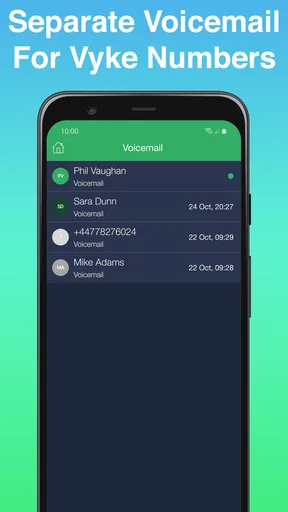
The setup is pretty much self-explanatory. You choose your number, verify your device, and you’re set. What I found particularly useful is that Vyke doesn’t just offer voice calls. It’s a complete communication tool with text messaging and voicemail capabilities. This makes it perfect for anyone needing a reliable second line without the overhead of another device.
Features That Make a Difference
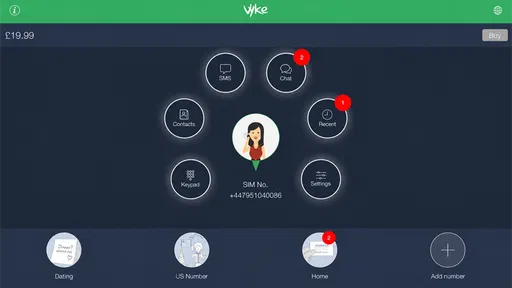
One of the standout features of Vyke is its ability to give you multiple numbers on one device. You can easily switch between them within the app, which is a lifesaver if you have different numbers for work, family, or other purposes. I found this especially useful during my testing period when dealing with different clients and personal contacts.
Another handy feature is the ability to make international calls at competitive rates. Vyke offers packages that can save you a ton, especially if you regularly call overseas. During my test calls, the connection was crisp and clear, almost indistinguishable from my regular phone service.
Vyke also integrates well with your existing contacts, making it easy to manage all your communications in one place. It even allows you to customize your voicemail for each number, which adds a personal touch that’s often missing from similar apps.
Experience and Usability
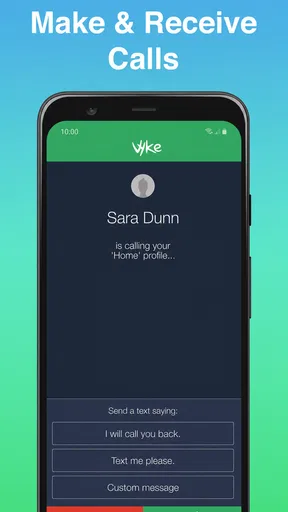
Using Vyke felt like second nature. The app is stable, with no noticeable lag or crashes during my use. The design is clean and user-friendly, which is a plus for anyone not particularly tech-savvy. Notifications for incoming calls and messages were prompt and reliable, ensuring I never missed an important contact.
Another aspect worth mentioning is the app’s lightweight nature. It doesn’t hog your phone’s resources, which is a relief if you’re juggling multiple apps at once. Plus, the battery usage is minimal, so I didn’t find myself constantly reaching for a charger.
Security and Privacy
In an age where data privacy is paramount, Vyke takes security seriously. The app encrypts calls and messages, ensuring your communications are safe from prying eyes. During my time with Vyke, I felt confident that my data was secure—a big win in my book.
Vyke also respects user privacy by not requiring a new SIM card or phone. This means less hassle and more privacy, as you’re not tied to a physical number or location. For someone like me, who values privacy, this feature alone makes Vyke worth considering.
Keeping the Line Useful Month to Month
A second number only saves effort if I keep its purpose clear. I would use one line for a specific role—such as client inquiries or a side project—and tell people to contact me there for that reason. That makes the app’s ability to handle more than one number more valuable than simply collecting numbers: each line can have a distinct audience and, with its own voicemail greeting, a clearer expectation about who will answer.
There is a trade-off in that flexibility. Multiple lines can make a phone feel more organized, but they also create another inbox to check. I would choose one number first, use it for a real need, and add another only if the separation genuinely helps. Otherwise, switching between lines and deciding which one to give out can become busywork rather than a convenience.
What to check before relying on it
People often want to know whether a second number will replace their regular phone service. I would treat Vyke as an additional app-based communication route, not as a guaranteed substitute for a carrier line. If dependable reachability is essential, keep your usual number available and test the new line with the people and situations that matter before depending on it for time-sensitive contact.
Cost is another practical question. The app is free to install, but in-app purchases range from $1.49 to $49.99 per item, so I would look at the purchase details that apply to the calling or number needs I actually have before committing. For occasional texts and calls, a second line may be worth keeping; for frequent international calling, compare the relevant package cost with the alternatives you already use rather than assuming the app will automatically be cheaper.
Compared with a second SIM or phone, Vyke avoids carrying extra hardware and gives me a way to manage another number on one device. Compared with messaging apps that require both people to use the same service, a phone-number-based approach can be more convenient when I need to contact someone through ordinary calls or texts. A carrier’s extra line may be a better fit for someone who wants service integrated directly into the phone plan, while a separate handset makes more sense when physical separation matters more than convenience.
Maintenance and sources of fatigue
The ongoing effort is less about setup than habit. I need to remember which number I shared, check the right inbox, and keep each voicemail greeting appropriate to its audience. A simple note in my contacts about why I use a particular line can prevent confusion later, especially if I am switching between personal and work conversations. That small bit of organization is what turns a spare number into a usable boundary.
There is also a natural point where a second line stops being helpful. If I rarely receive calls or messages on it, paying for extras or remembering to monitor it may not be worthwhile. If I give the number to too many unrelated people, it becomes another general-purpose inbox and loses the separation I wanted. I would review its purpose from time to time and stop using it for new contacts if the original need has passed.
Vyke is available for devices running Android 7.0 or later, and its current version is 1.22.5. The app has been around since February 4, 2016, which gives it a longer history than a newly launched utility, but I would still keep the app updated and make sure I can reach important contacts through another route. For any communication app, relying on a single channel for urgent matters is a needless risk.
Final Thoughts
All in all, Vyke: Second Phone/2nd Line is a solid app for anyone needing the flexibility of a second phone line without the extra hardware. It’s easy to use, feature-rich, and respects your privacy—everything you’d want in a modern communication tool. Whether you’re a business professional, a frequent traveler, or someone who simply wants to separate different aspects of life, Vyke is worth checking out.
So, if you’re tired of juggling multiple phones or SIM cards, Vyke might just be the solution you’ve been looking for. Give it a try, and see how it can simplify your life.
My lasting verdict is that this app earns space when I have a clear, recurring reason to maintain a second contact route: client calls, a side business, or conversations I want to keep apart from my personal number. It is less compelling for someone who wants a completely hands-off line, needs carrier-level service, or has no reason to manage a second inbox. I would start with one number, use it deliberately, and keep it only if the boundary continues to make everyday communication easier.
Pros
- Easy setup with multiple numbers.
- Affordable international call rates.
- User-friendly interface.
- Offers voicemail and call forwarding.
- Highly customizable notification settings.
Cons
- Limited free credits for calls.
- Occasional app crashes reported.
- Requires stable internet for calls.
- Some features locked behind paywall.
- Ads in the free version can be intrusive.
FAQs for Vyke: Second Phone/2nd Line
What is Vyke and how does it work?
Vyke is an app that provides users with a second phone number, allowing them to make calls, send texts, and manage contacts separately from their primary phone line. This is particularly useful for maintaining privacy, managing work-life balance, or handling multiple business clients without needing an additional physical phone.
Is Vyke available on both Android and iOS platforms?
Yes, Vyke is available for download on both Android and iOS devices. Users can find the app on the Google Play Store for Android devices and the Apple App Store for iOS devices, ensuring a seamless experience across different platforms.
How secure is my data when using Vyke?
Vyke takes user privacy and security seriously. The app uses encryption to protect your calls and messages. Additionally, Vyke allows users to have control over their data, ensuring that personal information and communications remain private and secure.
Are there any costs associated with using Vyke?
Vyke offers both free and paid options. While the app can be downloaded for free, users may need to purchase credits or subscribe to a plan for making international calls or sending messages. The pricing is generally affordable, making it a cost-effective solution for secondary phone usage.
Can I use Vyke for international calls and messages?
Yes, Vyke is designed for international communication. Users can make international calls and send messages at competitive rates, often cheaper than traditional carriers. This makes Vyke an excellent choice for people who need to stay connected with friends, family, or business contacts abroad.


